Thursday, August 25, 2011

SharePoint 2007 to 2010 upgrade woes


My initial setup was MOSS 2007 with a Web Front End and a SQL 2008 backend.

I read and read... and I tested an upgrade to 2010 in a test environment. Everything worked fine that I could tell.

So, counter to multiple vendors telling me not to do an in place upgrade, I went ahead and did it.

Upgrade went mostly flawlessly. Three things to note though:

1. Search Crawls weren't working after the upgrade. Solution: Central Administration -> Search Administration.... click on the name for the default content access account and put in the password. Although it is managed as a managed service account.... there was no impact to changes there.
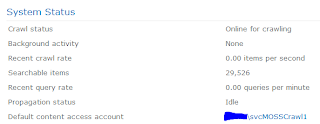
Once I put in the password on the
Search Administration page, everything started working.


2. Search Crawls weren't indexing pdf's anymore. Had to add some registry settings that mirrored the MOSS 2007 settings. Followed the guide here: http://nickgrattan.wordpress.com/2010/06/14/adobe-pdf-ifilter-indexing-with-sharepoint%c2%a02010/

Thanks Nick.

3. This was the big one. No matter what I did, I could not get to the Central Admin site unless I used the start menu on the WFE. That link actually uses a power shell command to invoke the Central Admin site. But that just wasn't right.

Well, it turns out that I had configured MOSS 2007 to use Kerberos and it was working great for 2+ years. Upgrading to 2010 broke that when it came to authenticating to the Central Admin site.

The solution was ultimately to add two SPNs to the service account that runs the web application for the Central Admin site. So now instead of two SPNs:

HTTP/servername:port
HTTP/servername.fqdn:port

I have two more:

HTTP/servername
HTTP/servername.fqdn

So, it looks like somehow, the port isn't used as much anymore. Although, I left those two SPNs in there just in case.

After 3+ hours of working with Microsoft, we finally got it. Hopefully it'll save you a few minutes.

Cheers,
Clyde

Tuesday, August 25, 2009

Yet another booger of a Malware.

So, I'm not really a good malware remover guy. But, alas, even with protections in place and administrative priveledges removed... I still end up with some folks with malware. I got a panic call from one of my users. His "work" computer... which is really his laptop... is "reporting" infections all over the place. I thought I had trained him well... in the sense that his first reaction was to shut down his computer without hitting any screens. I think he might have clicked the wrong thing and sure enough something really nasty is installed.

So, I pull out the trusty thumbdrive with Malwarebytes' mbam software on it... http://www.malwarebytes.org/mbam.php

And, it won't run. So the malware knew how to disable that. So, I try to pull up the task manager, but the malware had disabled that too.

I went back to my thumbdrive and looked for process explorer: http://technet.microsoft.com/en-us/sysinternals/bb896653.aspx but I guess I left it off my thumbdrive. So, I pulled out my trusty leatherman and pulled out the hard drive.

Took the drive back to my bench machine. Downloaded mbam, updated and disconnected from the network just in case. Attached the drive using a USB to IDE converter. And now, I'm running mbam against the drive. Sure enough, 17 objects infected so far. And the realtime anti-virus kicked off once when mbam triggered on a file. I'll post back when and if I get a name.

Sometimes, booting to another machine is handy. But, I can't help but think that if the drive had been encrypted... which makes more security sense... I would have been screwed for scanning it on another machine.

All for now. Cheers.

P.S. Okay... well... according to mbam.... the drive 16 instances of Trojan.Dropper, 1 Trojan.Downloader, and 1 Trojan.Fakealert.

Thursday, August 20, 2009

Luckily recovered a bricked Linkstation Pro

It all started when I was trying to backup my data on my NAS. I have a Buffalo Linkstation Pro with 250GB drive. Well, the USB drive was recognized but alas, the NAS would not backup to the external USB drive.

So, I figured I'd update my firmware. And, I was lazy. So I downloaded the newest firmware from Buffalo's website. I was sitting in my lazy boy and decided I'd flash the firmware over the wireless. I know! I know! Bad idea. Well, having flashed a lot of things over the years, I got a little complacent. And, I figured, what's the worst that could happen?

Well, the firmware just took forever and wouldn't ever complete. Then I got a little impatient. Who would have thought a firmware would be so large. Anyway, I power cycled the thing... against my better judgement because it would not do anything anymore.

Then, the moment of truth. Power cycle resulted in a nasty beeping post sound and a flashing red light. Looked up the flash code and sure enough, it was a "E04 - flash error." Great!

So, I put it away for the day... I didn't have my USB to SATA adapter at home. Next night, I figured I'd at least recover my data from the drive... I was orignally trying to back it up, right? So I read some articles/posts on the web and it looked like Buffalo might have taken some steps to prevent just plugging in the drive to a linux box. But the version I have, LinkStation Pro (LS-250GL) might not have any issues. I plugged it in to my USB to SATA drive enclosure and then plugged it into my Ubuntu laptop. Three windows popped up... awesome! One of the windows was the mounted partition of the data. So I copied off my data.

Next night, I decided to try this procedure. And, I decided to not go with wireless for this round... duh! Bummer... LS flash program from Buffalo wouldn't detect the NAS. Ran a ping scanner and it wasn't on an alternate IP. Set the subnet to 192.168.11 but still couldn't find the bloody thing. Hit the reset button on the back.... held the reset button on back... held reset on power on... lots of different sounds but no joy. Finally stumbled upon this. Talked about a arm9 box... what's that? Dunno. But, maybe the Linkstation would network boot.

Sure enough, I ran a TFTP server on 192.168.1.1 and power cycled the Linkstation and it took a load from the TFTP server. Then I was able to get the Buffalo firmware updater to "find" the NAS. Then it took the firmware perfectly. It was nice and quick (compared to wireless.) Booted up the NAS, configured a static IP, setup some shares and I'm back in business.

I still need to transfer my data back to the NAS and see if I can get the backup function to work... but at least I didn't have to throw away a perfectly good box.

A big thanks goes out to all those life hackers out there that helped get this thing back running.

Cheers,
Clyde

Don't forget your modem can be a router too!

Well, I spent a few hours last night setting up my webcam to be viewable from the internet. I have a Panasonic BL-C131A and so far I like it a lot. I had it working from my internal network just fine but I decided that I'd like to be able to access it from the internet.

So I set up port forwarding on my Vonage router which sits right behind my DSL modem. I tested from the internet and darn it... it wouldn't work.

So I thought.... maybe the ISP was blocking port 80 to prevent web serving from home. So, I changed the port on the webcam and confirmed it worked from the inside network. Changed the port forwarding on the Vonage router. And tried again. It still wouldn't work.

I couldn't tell if the Vonage router wasn't port forwarding or if maybe my "test" from the internet had a firewall that was blocking streaming or something to that effect. Oh yea, and the Vonage router has something that says "WAN blocking..." What is that? The help says that it blocks incoming from the WAN. Too general of a help file really doesn't help me here. So, I experimented with the setting and it didn't make any difference.

So I went to Shields Up to do a port scan on my home router. I only set it to scan the specific port I was interested in. Well, it reported that the port was "Stealth." I was stumped.

But then I happened to notice that my Vonage router had a 192.168 for a WAN IP. Ah hah. Another NAT and maybe another source for my problem.

So, I logged into my DSL modem and realized that I needed to get traffic from the WAN through. So, I turned off NAT. Because, really, I don't want two firewalls to deal with on my home connection. But, that broke everything and I didn't feel like figuring out why. Probably has something to do with a static route that might need to be set up.

I turned NAT back on and then found that the DSL modem also had a port forwarding option. So, I setup a port forward to forward to my Vonage router to work in conjunction with a port forward to my webcam.

Tested it... and voila... finally.

Lesson learned.... - sometimes modems are really routers. Too bad it took me a couple of hours to figure that out.

Cheers for now!
Clyde

So, Here's the thing

So, Here's the thing. I'm an IT guy and I try to solve problems every day and I depend on the web for answers. Most of the time, I can piece together problems that others have solved and make it fit or work in my environment. But, SOMETIMES, I actually have to think and experiment until I figure it out. I don't believe I'm smart enough or dedicated enough to contribute to the real expert IT sites but hopefully some of these posts will someday help someone figure out what their problem is. Cheers!